Focus Pocus
Get an AI-written plan into OmniFocus as real projects and tasks without hand-fixing TaskPaper imports every time.
- AI integration
- Automation
- macOS
Retired. I no longer use or maintain this project.
Problem
Between my MBA and my CCHL chapter commitments, I was always planning small projects and breaking the work down into my task list. I was already using AI to help me plan, so the next step was getting those plans into OmniFocus.
I’ve used OmniFocus for a long time because it supports GTD and can stay fully offline. The only way in was to ask the AI for TaskPaper text and import it, and that was fraught. Each AI tool had different luck getting every task to load, and the details on each task often didn’t come through.
I wanted to see how AI coding was evolving and whether I could fix my own workflow along the way. I named it Focus Pocus myself.
Options
I prototyped each of these and chose the one that met the most of my goals. Only two of them could read and change tasks without bringing OmniFocus to the front.
- Works on macOS: OmniFocus is automated through macOS, with my permission.
- Works in the background: Nothing opens or pops up on screen while Claude is working.
- Reads tasks as well as writing them: Claude has to see what’s already there to answer questions and avoid duplicates.
- Fast bulk changes: A whole project of tasks can be created or changed without my 1,600-task database grinding to a halt.
| Option | Works on macOS | Works in the background | Reads tasks as well as writing them | Fast bulk changes |
|---|---|---|---|---|
| Keep converting to TaskPaper | Yes | No | No | Partly |
| OmniFocus URL scheme or Actions | Yes | No | No | No |
| AppleScript bridge | Yes | Yes | Yes | Partly |
| JXA behind an MCP serverChosen | Yes | Yes | Yes | Partly |
Why JXA behind an MCP server won: it was the most complete way to read and change OmniFocus in the background, and MCP let Claude Desktop find and use the tools without any custom integration.
Build
This wasn’t agentic coding yet. I built the codebase piece by piece, with Claude Code working at my direction. I started with a list of what the server needed to do and a test prompt for each one, broke the prompts into phases and worked through them, testing in both Claude Code and Claude Desktop.
JXA was the hardest part. There’s no REST API to call. You talk to the OmniFocus process itself, so the app has to be running, and the documentation is hard to navigate. Many scripts only ran reliably when saved as files, which made them slow to start, so I added caching and pagination to keep a big database usable.
We kept hitting errors when reading values from OmniFocus. I asked Claude to work it out from the documentation, but neither of us could piece together how it all fit. From reading the docs myself, I came up with a safeGet pattern: if the normal way to read a value fails, try another way, then fall back to a sensible default instead of crashing. Claude built it into every script, and I had to point it back to the pattern more than once when it tried to drop it.
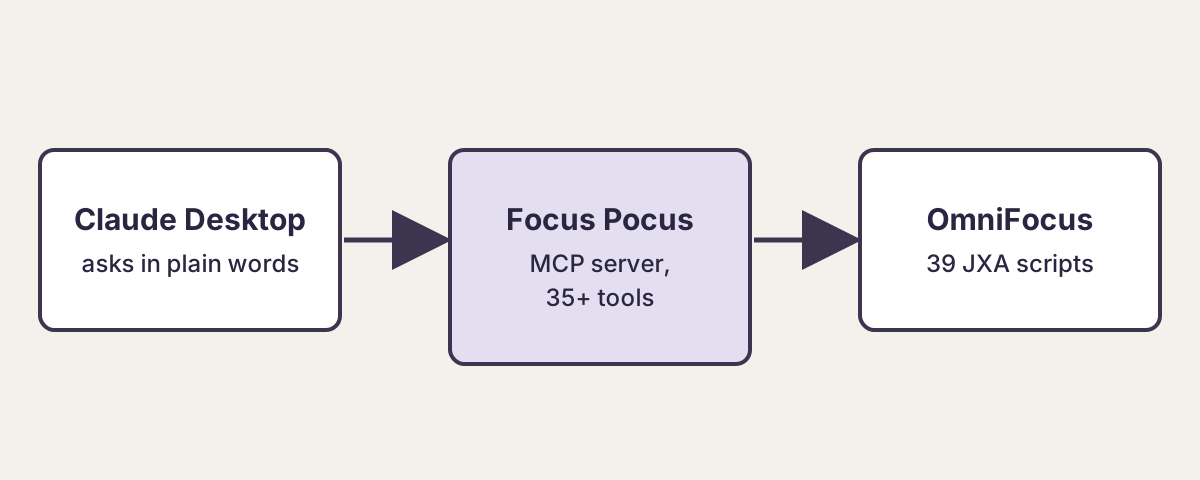
It ended up as an MCP server in TypeScript on Node.js, about 3,800 lines, with more than 35 tools for tasks, projects, tags and perspectives, and 39 JXA scripts behind them. It understands dates like “tomorrow at 2pm” or “next Friday”.
The real test was my MBA exchange to France. From one conversation, Claude built the packing list in OmniFocus as projects, tasks and subtasks with dates. Apart from one small hiccup with dates, it worked, and the list was useful on the trip.
- Focus Pocus on drc.dev This is not a live demo.
- Source code for Focus Pocus
Lessons
Managing context was the biggest issue. I kept having to rebuild from scratch because I wasn’t writing specs alongside the code. In my more recent projects I build specs and guardrails first. They keep the AI on track and let me run sessions with smaller context and more subagents.
The integration was cool, but JXA made it extremely fragile. Most systems weren’t built with AI in mind, and that gap shows up everywhere. Connecting AI to the systems people already rely on, and automating the process and complexity around them, is some of the most valuable work AI can do.
I don’t use Focus Pocus anymore. I’m moving off OmniFocus to a task manager with an MCP server built in. The full story of the build is in the post Building Focus Pocus: what I learned about AI coding and integration.